
Disclosure: Gadgets Finds is an Amazon Associate. We may earn from qualifying purchases if you buy through links on this page, at no extra cost to you. Prices and availability change on Amazon.
Buying Guide
Best PS5 Accessories Worth Buying in 2026
Last updated: November 2026
The PlayStation 5 is a strong console on its own. A handful of accessories still change how it feels day to day: more room for games you can actually launch, a controller you can tune, a headset that does not die mid-session, and a dock or stand that removes a small daily annoyance. Most of the rest is decoration.
This guide stays on five products that earn the money in 2026. Each card below links to the original new listing, not a search page and not a renewed or refurbished unit. A Samsung 990 Pro with a heatsink is mentioned only as an unofficial SSD alternative. It does not get its own button.
Which one you need depends on the console you already own. The original PS5 has an 825 GB drive and leaves roughly 667 GB for games. The Slim ships with 1 TB. The PS5 Pro ships with 2 TB. Storage is the first purchase for most original and Slim owners. It is optional on a Pro unless your library is already crowded. A headset matters if you play with headphones. The DualSense Edge matters if you want back buttons and replaceable sticks. The dock and the vertical stand are convenience, not performance.
1. Internal SSD Expansion
Modern games are large, and the console will not play PS5 games from a typical USB hard drive. USB extended storage can hold media and PS4 games, and it can archive PS5 installs, but those PS5 games still have to be copied back to internal or M.2 storage before they launch. An internal drive is the upgrade that removes that shuttle. Sony's expansion bay takes a PCIe Gen4 x4 NVMe SSD in a Socket 3, Key M slot, in 2230, 2242, 2260, 2280, or 22110 length, with a sequential read of at least 5,500 MB/s. The heatsink, including any thermal plate, has to stay within 25 mm wide and 11.25 mm tall: no more than 8.0 mm above the board and 2.45 mm below it. A bare drive that meets the speed number can still throttle or fail to seat if the cooler is missing or too tall.
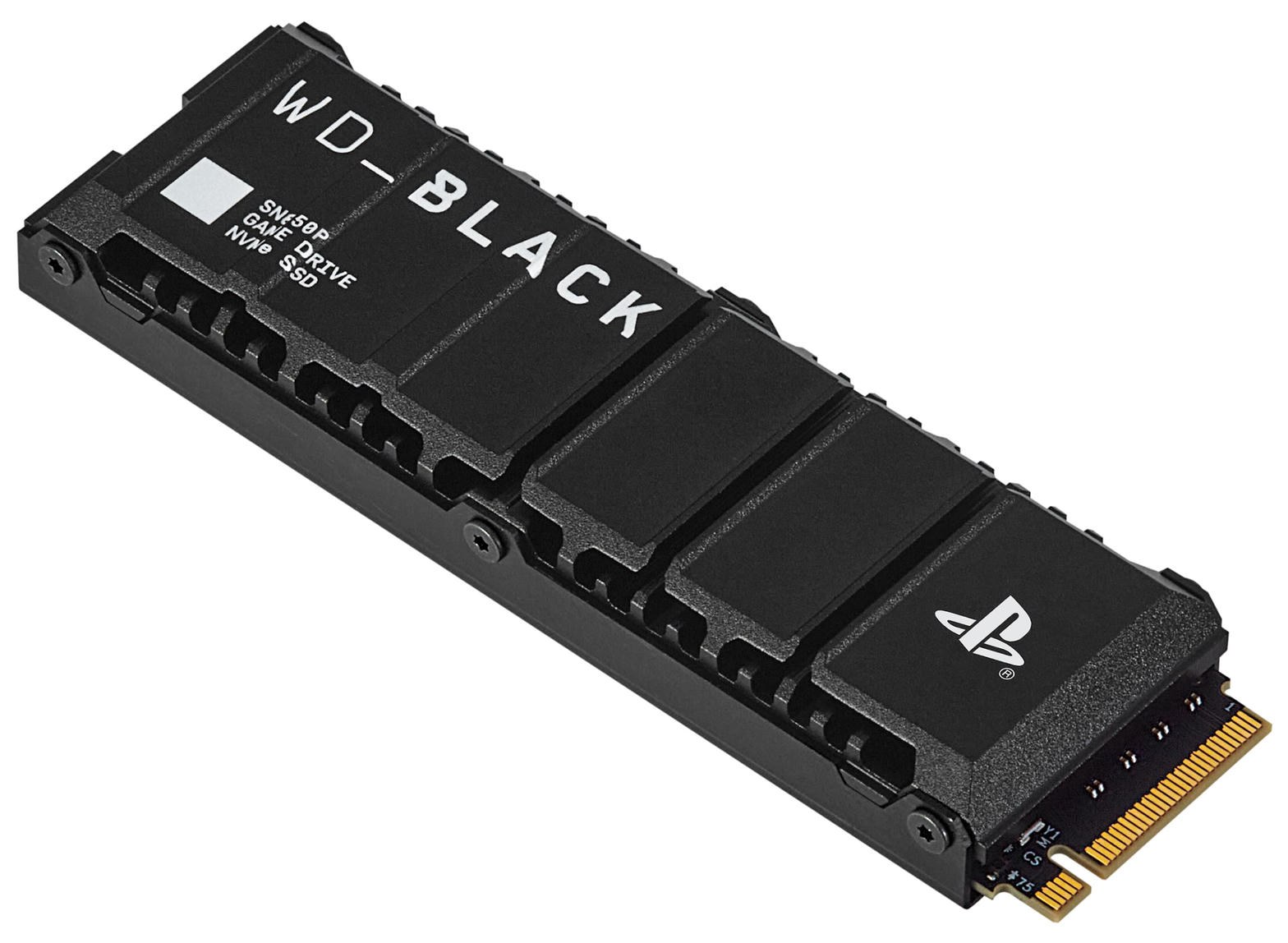
WD_BLACK SN850P
- Model linked: 2TB heatsink, WDBBYV0020BNC-WRSN
- Interface: PCIe Gen4 x4, M.2 2280
- Rated speed: Up to 7,300 MB/s read and 6,600 MB/s write
- Heatsink: Integrated, 80 x 24.46 x 9.89 mm, PlayStation logo
- Endurance and warranty: 1,200 TBW, 5-year limited warranty
The WD_BLACK SN850P is Western Digital's officially licensed drive for the PlayStation 5. The 2TB model in this card, part number WDBBYV0020BNC-WRSN, is tested and certified for the console, and it ships with the heatsink already fitted. That cooler is shaped for the PS5 bay rather than a desktop motherboard, and at 9.89 mm tall it sits inside Sony's 11.25 mm limit. You do not add a second heatsink on top. The gold-finger end seats in the M.2 slot the same way a PC drive does.
Western Digital rates this 2TB capacity at up to 7,300 MB/s sequential read and 6,600 MB/s sequential write, with 1,200 TBW of endurance. The 1TB heatsink model is a different part and is rated for a slower 6,300 MB/s write. The 4TB heatsink model, WDBBYV0040BNC-WRSN, matches the 2TB speeds and costs more. Random performance on the 2TB is listed at 1,200K read IOPS and 1,100K write IOPS. Those are drive specs, not a promise that every game will load twice as fast as the console's built-in SSD. What you actually gain is room. Games installed on the SN850P launch from that drive. You do not copy them back to the internal SSD to play.
Installation is the same on the original console, the Slim, and the PS5 Pro. Power the console off completely and unplug it. Lift the side plate that covers the expansion bay, remove the small screw and cover over the M.2 slot, and insert the drive at a slight angle until it clicks into the connector. Fold it down, secure it with the captive standoff screw, replace the cover and the plate, then plug the console in. The PS5 formats the drive on first boot. Do not stack an extra cooler on the licensed heatsink, and do not force a drive that is taller than the bay.
A Samsung 990 Pro with its own heatsink is a common unofficial alternative that also clears Sony's 5,500 MB/s floor, provided the cooler still fits the height limit. It is not PlayStation-licensed and it is not the drive linked on this card. Buy that one only if you have already checked the heatsink dimensions against the bay.
This page does not pin an Amazon price because it moves. Open the listing and read the current number. The link is the 2TB heatsink model, not a 1TB drive and not a heatsink-less SN850 sold for PCs.
Strengths
Officially licensed, heatsink already fitted for the PS5 bay, fast enough to play games directly from the drive, and a 5-year warranty with 1,200 TBW on the 2TB model.
Limitations
2TB pricing in 2026 is far above the old budget range. The heatsink can be too tall for some PC motherboards, so this is a console drive first. A Pro owner with 2TB already installed may not need it yet.
Verdict: Highest priority for most players. Best suited for: Original PS5 and Slim owners who keep deleting games to make space.
View on Amazon2. DualSense Edge
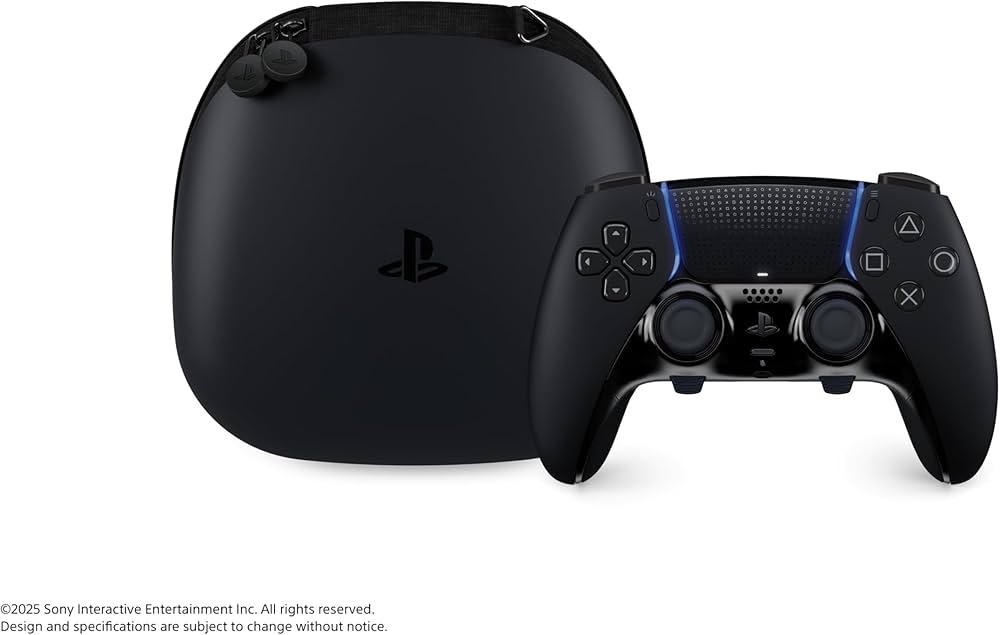
DualSense Edge
- Listing: Original white controller, sold new
- Back buttons: Two slots, lever and half-dome sets included
- Battery and weight: 1,050 mAh built-in, about 325 g
- Cable: Braided USB-C, about 9.1 ft, with a lock
The DualSense Edge is Sony's pro controller for the PS5. It is still a DualSense: the same haptics, adaptive triggers, and layout, with a longer rubberized grip and a set of controls a standard pad does not have. The link on this card is the original white controller sold new. Midnight Black is a different listing. Do not substitute a unit described as renewed or refurbished if you want a new controller.
Two back-button slots sit under the grips. The box includes both shapes Sony ships: a lever paddle and a half-dome. Either can be mapped to another button, which is the practical gain in shooters and fighting games. You keep your thumbs on the sticks while jump, slide, or a paddle input lives underneath. Trigger stops on L2 and R2 shorten the throw in three positions, which helps when a game does not need the full adaptive-trigger travel. Stick sensitivity and dead zones are adjustable, and the controller stores profiles you can swap with the function buttons without leaving the game. Sony allows up to four profiles on the pad.
The stick modules unlatch. If a stick starts to drift, you replace the module instead of the whole controller. Extra modules are sold separately. The kit also includes extra stick caps in different heights, a carrying case, and a braided USB-C cable about 9.1 feet long with a connector lock so the plug does not walk out during a match. It works on PS5 consoles, including the Pro, and on PC over USB or Bluetooth.
The tradeoff is battery and price. Sony's manual lists a built-in 1,050 mAh battery and a weight of about 325 g, heavier than a standard DualSense. Battery life is moderately shorter than the regular pad. With haptics and the speaker in use, a session often lands around five to six hours, not an all-day charge. It is still a luxury next to a standard DualSense. Confirm the live price on Amazon. Buy it if you will use the back buttons or you want a repairable stick. Skip it if a standard controller already does everything you need.
Strengths
Remappable back buttons, trigger stops, on-controller profiles, and stick modules you can replace instead of retiring the pad.
Limitations
Expensive next to a standard DualSense, and the battery does not last as long. Replacement stick modules are an extra purchase.
Verdict: Best for serious players. Best suited for: Competitive players and anyone who wants back buttons or a controller they can repair.
View on Amazon3. Headset
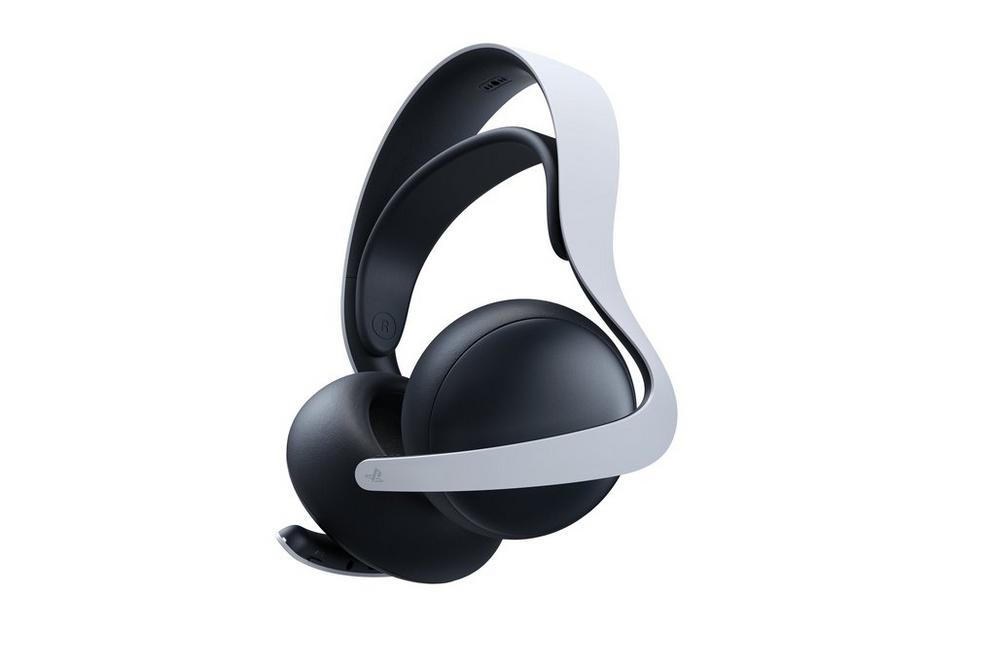
PULSE Elite
- Type: Official over-ear headset, planar magnetic drivers
- Wireless: PlayStation Link USB adapter, plus Bluetooth
- Battery: Sony rates about 30 hours
- Mic: Retractable boom
Television speakers are fine until someone else is in the room, or until you want footsteps and voice chat in the same mix. The PULSE Elite is Sony's current over-ear headset for that job. The link is the official new headset, not a renewed listing and not the older Pulse 3D. The Pulse 3D used a different driver and a much shorter battery. Do not buy that older model thinking it is this one.
The Elite uses planar magnetic drivers, the same family of driver Sony brought over after acquiring Audeze, in a closed-back design. Wireless play on a PS5 goes through PlayStation Link. The box includes the USB adapter, and the same adapter also connects the headset to a PC or a Mac. Bluetooth is there for a phone or a second device, and the headset also works with a PlayStation Portal. A 3.5 mm wired connection is available when you do not want a dongle. On-ear controls cover volume and mic mute, and the boom mic retracts into the ear cup when you are listening alone. Sony rates battery life at about 30 hours. Independent tests have often run longer than that on the dongle, so 30 hours is a floor rather than a stretch claim. Charging is USB-C. A hanger is included so the headset can sit on a desk and charge instead of living on the floor.
Tempest 3D Audio is a console feature, not something the headset has to license separately. Any decent headphone can play it. What you pay for here is the official wireless path, the mic, the battery, and a fit that is meant for long sessions rather than a phone call. The weight is about 340 g. There is no active noise cancelling. If you already own a comfortable headset you like on PC, you do not need to replace it just because it lacks a PlayStation logo. If you want one headset that pairs cleanly with the console, the Portal, and a computer, this is the official one to buy. Confirm the live price on Amazon.
Strengths
Planar drivers, a long rated battery, a retractable mic, and PlayStation Link that also covers PC, Mac, and Portal.
Limitations
No active noise cancelling. Easy to confuse with the cheaper, older Pulse 3D. Unnecessary if you already have a headset you trust.
Verdict: Best official headset. Best suited for: People who play with headphones and want one wireless set for the PS5 and a PC.
View on Amazon4. Controller Charging Station
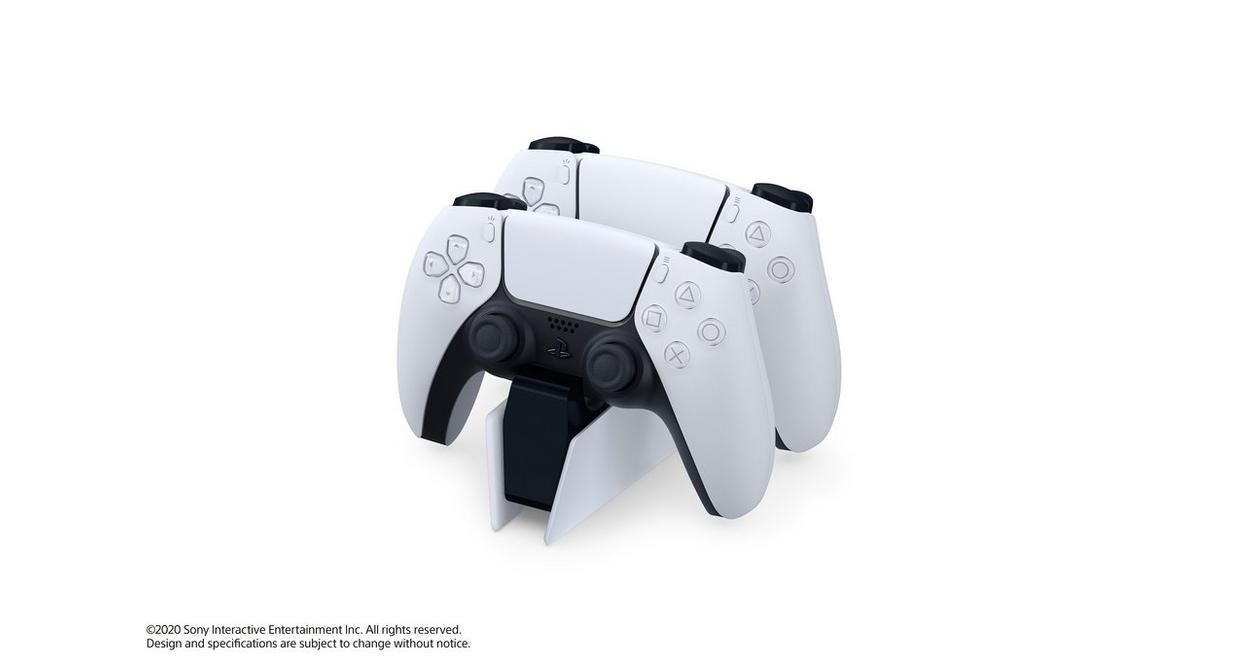
DualSense Charging Station
- Model: CFI-ZDS1, Sony's official dock
- Capacity: One or two controllers at once
- Charge time: About 3 hours from empty
- Power: AC adapter in the box, 5.1 V, 2.8 A
- Size: About 52 x 62 x 159 mm, roughly 180 g
A charging station does not make the console faster. It stops the other problem: two controllers, one cable, and a USB port you would rather leave free for a headset dongle or an external drive. Sony's DualSense Charging Station, model CFI-ZDS1, is the official dock. Some Amazon titles shorten or mistype that model as CF1-ZDS1. The listing linked here is the station itself, with the AC adapter, not a cable-only adapter kit.
You seat a controller onto the contacts until it clicks. The light bar blinks orange while it charges and turns off when the battery is full. Sony's manual says a fully drained controller takes about three hours, whether you dock one pad or two. The included adapter is rated 100–240 V in and 5.1 V, 2.8 A out, so the dock does not borrow power from the console. The station is about 52 mm wide, 62 mm tall, and 159 mm deep, and it weighs about 180 g. It matches the white-and-black look of the console instead of adding a third-party brick covered in LEDs.
The same contacts fit a DualSense Edge. Sony's own product photos show an Edge seated on this dock next to a standard controller, which is what the picture on this card shows. You do not need a separate Edge-only cradle. Stock on the official station comes and goes. Skip no-name docks that wobble or only charge through a loose USB plug. Confirm the live price on Amazon.
Strengths
Charges two pads, including an Edge, in about three hours, with the power adapter included and the console USB ports left free.
Limitations
It is a convenience, not a performance upgrade. A single player with one controller and a cable already on the desk can skip it.
Verdict: Best official dock. Best suited for: Homes with two controllers or anyone tired of swapping one charge cable.
View on Amazon5. Vertical Stand
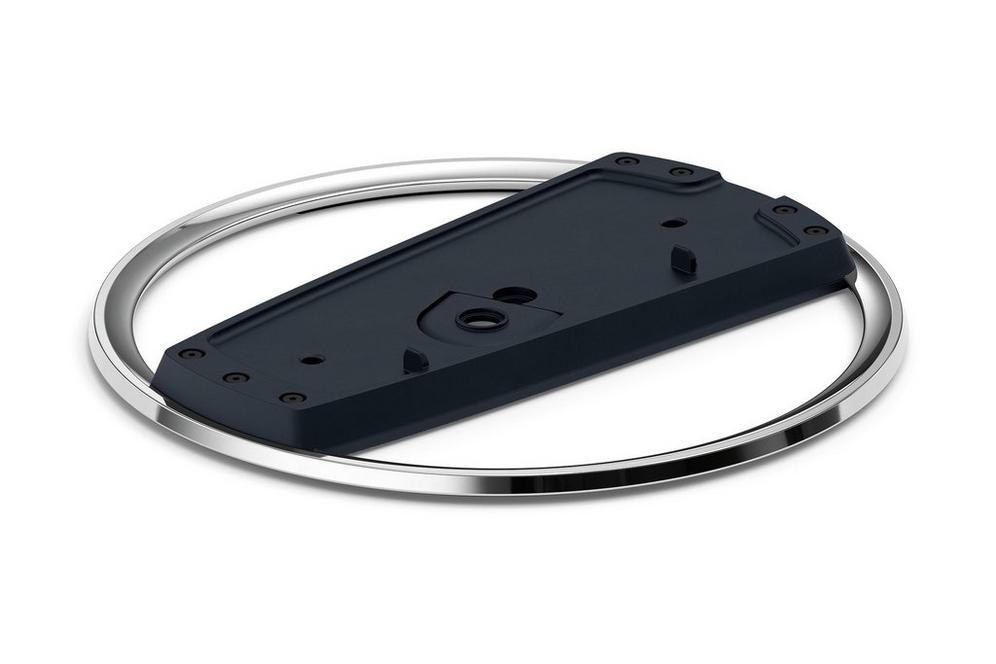
PlayStation Vertical Stand
- Model: CFI-ZVS1, official Sony stand
- Fits: CFI-1000, Slim CFI-2000 and CFI-2100, and PS5 Pro
- In the box: Stand, mounting screw, console attachment, manual
- Size: About 190 x 190 mm, 42 mm tall, roughly 30 g
The launch PS5 included a stand that worked both flat and upright. Sony stopped putting a vertical stand in the box with the Slim and the PS5 Pro. Those consoles can still stand upright on their own, and airflow does not require a ring under them. What they lack is a wide, screwed-down base. In a household with kids, pets, or a narrow shelf, that is the difference between a console that stays put and one that tips when someone brushes past it. A disc-drive console is the more top-heavy of the two.
The official PlayStation Vertical Stand, model CFI-ZVS1, is a chrome ring with a black plate that screws into the console. Sony lists it for the original CFI-1000 group, the Slim CFI-2000 and CFI-2100 groups, and the PS5 Pro. The box includes the stand, a mounting screw, a console attachment, and a short manual. Dimensions are about 42 mm high and 190 mm across, and the stand itself is only about 30 g. It is not a light-up third-party base and it is not a horizontal foot. The link is Sony's stand. Confirm the live price on Amazon.
Buy it if the console lives upright in a spot where a bump is likely, or if you simply want the official base under a Slim or a Pro. Leave it if the console is horizontal, or if your original launch unit still has the stand it came with. A cheap RGB stand does not cool the console and often blocks the lower vents. That is a worse trade than using no stand at all.
Strengths
Official fit for the original console, both Slim groups, and the Pro, with a real screw instead of a friction-fit ring.
Limitations
Not required for the console to run or to stand. Pointless if you keep the PS5 flat, and redundant on a launch console that still has its original stand.
Verdict: Worth it only for vertical setups. Best suited for: Slim and PS5 Pro owners who stand the console up and want it screwed in.
View on AmazonAccessories Worth Skipping for Most People
The PS5 accessory aisle is mostly things that do not change how the console plays. A few categories are consistent enough to skip unless you already know you want them.
- RGB light strips, shell plates, and decorative covers. They change the look and nothing else. Some plates also cover vents the console uses.
- Clip-on cooling fans and extra exhaust gadgets. The PS5 already moves a lot of air. A fan strapped over an intake usually adds noise and can disturb the path Sony designed. Fix real heat problems by giving the console open space, not by buying a clip-on blower.
- No-name controllers. Stick drift is the failure you are trying to avoid, and an unbranded pad with no replaceable modules is a worse bet than a standard DualSense. If you want repairable sticks, that is the Edge, not an unbranded pad with macro buttons.
- The media remote, unless the PS5 is the television you actually watch. It is a real Sony product and a poor default purchase for someone who mostly plays games.
- USB hard drives bought as "PS5 storage upgrades." They do not play PS5 games. Use them for PS4 libraries and for parking installs you are willing to copy back later. The drive that plays PS5 games is the internal M.2.
- A second heatsink for a drive that already has one, and any SSD whose cooler exceeds 11.25 mm. It will not seat, or it will force the bay cover.
Quick Priority Guide
Buy in this order unless your setup already covers a row. A Pro with 2 TB free can skip the SSD. Someone who never uses headphones can skip the headset. Everyone else should resist starting with the stand.
| Accessory | Priority | Who needs it |
|---|---|---|
| WD_BLACK SN850P | High | Original PS5 and Slim owners who are out of space. Optional on a PS5 Pro. |
| PULSE Elite | High | Anyone who plays with headphones and does not already have a set they like. |
| DualSense Edge | Medium | Competitive players, or anyone who wants back buttons and replaceable sticks. |
| DualSense Charging Station | Medium | Two-controller homes. Skip if one cable already solves it. |
| PlayStation Vertical Stand | Low–Medium | Slim and Pro owners who stand the console upright. Not a performance part. |
Final Verdict
Start with the WD_BLACK SN850P if you are deleting games to install the next one. The 2TB heatsink model, WDBBYV0020BNC-WRSN, is the officially licensed drive, it plays games from the expansion bay, and it is the correct shape for the slot. Pay the 2026 price, not the price this category had two years ago, and do not buy a USB drive hoping it will do the same job. On a PS5 Pro that still has free space, spend the money elsewhere.
The PULSE Elite is the headset to add if you play with headphones and you want the official wireless path, a retractable mic, and a battery Sony rates around 30 hours. The DualSense Edge is the best controller in the lineup and an optional one: back buttons, trigger stops, profiles, and stick modules you can replace, and a shorter battery than the standard pad. Confirm the live price on Amazon. Get the white new listing, not Midnight Black and not a renewed unit, unless you have decided you want that other color on purpose.
The DualSense Charging Station and the PlayStation Vertical Stand come after those. The dock, CFI-ZDS1, charges two controllers, including an Edge, in about three hours. The stand, CFI-ZVS1, screws a Slim or a Pro down if you insist on vertical. Neither one belongs ahead of storage or audio. Prices move, and a listing can sell through. Use the button under each review, confirm you are looking at the original new product, and check the live price before you order.
Questions people ask before buying
What PS5 accessory should I buy first?
The WD_BLACK SN850P 2TB if you are deleting games to install new ones. A PS5 Pro with free space can skip the SSD.
Does a USB hard drive play PS5 games?
No. USB storage can hold PS4 games and parked installs. PS5 games have to run from the internal SSD or an M.2 drive in the expansion bay.
Is the DualSense Edge worth it?
Only if you want back buttons, trigger stops, and stick modules you can replace. The battery is shorter than a standard DualSense. Confirm the live price on Amazon.
Which PS5 accessories are a waste of money?
RGB plates, clip-on cooling fans, no-name controllers, and a second heatsink for a drive that already has one.
Confirm the drive capacity, heatsink height, and current price on Amazon before you buy. A renewed or refurbished listing is a different product from the originals linked above.