
Disclosure: Gadgets Finds is an Amazon Associate. We may earn from qualifying purchases if you buy through links on this page, at no extra cost to you.
Laptops
Best MacBook to Buy in 2026: Air vs Pro Compared
Updated November 2026 · Specs from maker pages and Amazon listings
The best MacBook to buy in 2026 for most people is the 13-inch MacBook Air with M5: silent, light and fast enough for school, office work and photo edits. Choose the 14-inch MacBook Pro M5 if you need the brighter XDR screen, HDMI and an SD slot. The 16-inch M5 Max is only worth it for heavy video, 3D or local AI work every day.
Below are the four MacBooks worth considering, a side-by-side table, and the three choices that matter most: Air or Pro, how much memory, and how much storage. Apple memory and storage cannot be upgraded later, so those two decide how long the Mac stays useful.
MacBook Air vs MacBook Pro: specs compared
| Product | Best for | Chip | Memory / storage | Display |
|---|---|---|---|---|
| MacBook Air 13-inch (M5, 16GB, 512GB) | Best for most people | Apple M5 | 16GB / 512GB | 13.6-inch Liquid Retina, 2560 x 1664 |
| MacBook Pro 14-inch (M5, 16GB, 1TB) | Best for creators and developers | Apple M5 (10-core CPU, 10-core GPU) | 16GB / 1TB | 14.2-inch Liquid Retina XDR, up to 1600 nits HDR peak |
| MacBook Pro 16-inch (M5 Max, 36GB, 2TB) | Most power | M5 Max, 18-core CPU, 32-core GPU | 36GB / 2TB | 16.2-inch Liquid Retina XDR, ProMotion up to 120Hz |
| MacBook Pro 14-inch with PROLED XDR display (2026) | Newest display | M5 Pro or M5 Max, depending on the listing | Check the exact listing | 14.2-inch PROLED XDR (tandem OLED, touch) |
We did not lab-test these products and do not publish star ratings or scores. Check the live price, seller and stock on Amazon before you buy.
1. MacBook Air 13-inch (M5, 16GB, 512GB)
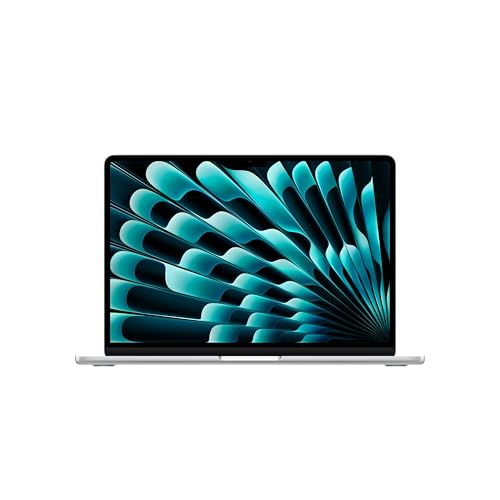
Best for: most people
- Chip: Apple M5
- Memory / storage: 16GB / 512GB
- Display: 13.6-inch Liquid Retina, 2560 x 1664
- Ports: MagSafe 3, 2x Thunderbolt 4, headphone jack
- Battery (Apple rating): Up to 18 hours video
Why we picked it
The everyday thin-and-light Mac. It has no fan, so it is silent, and the M5 handles browsing, office work, photo edits, and light video without trouble. Apple lists this configuration at $1,299; Amazon's price moves, so read the live listing.
It supports up to two external displays. Fast charging needs a 70W or higher USB-C charger; the US box ships with a smaller adapter.
Who should skip it
Skip it if you need HDMI, an SD slot, or long 4K exports. That is a MacBook Pro.
$1,049.00 on Amazon as of Nov 25, 2026, 1:51 PM UTC
Product prices and availability are accurate as of the date/time indicated and are subject to change. Any price and availability information displayed on Amazon.com at the time of purchase will apply to the purchase of this product.
2. MacBook Pro 14-inch (M5, 16GB, 1TB)

Best for: creators and developers
- Chip: Apple M5 (10-core CPU, 10-core GPU)
- Memory / storage: 16GB / 1TB
- Display: 14.2-inch Liquid Retina XDR, up to 1600 nits HDR peak
- Ports: 3x Thunderbolt 4, HDMI, SDXC, MagSafe 3, headphone jack
- Battery (Apple rating): All day; same speed on battery as plugged in
Why we picked it
This replaced the 14-inch M4 MacBook Pro, which was no longer sold new on Amazon when we checked on Nov 22, 2026. The M5 keeps the same display and ports and adds a Neural Accelerator in each GPU core, which speeds up on-device AI work.
Most buyers should stay on the base M5. Choose an M5 Pro or M5 Max only if you export big timelines or run virtual machines all day. Pick the storage you will keep, because Apple's upgrades cannot be added later.
Who should skip it
Skip it if you already own an M4 MacBook Pro. There is no reason to upgrade.
$1,749.00 on Amazon as of Nov 25, 2026, 1:51 PM UTC
Product prices and availability are accurate as of the date/time indicated and are subject to change. Any price and availability information displayed on Amazon.com at the time of purchase will apply to the purchase of this product.
3. MacBook Pro 16-inch (M5 Max, 36GB, 2TB)

Best for: Most power
- Chip: M5 Max, 18-core CPU, 32-core GPU
- Memory / storage: 36GB / 2TB
- Display: 16.2-inch Liquid Retina XDR, ProMotion up to 120Hz
- Ports: 3x Thunderbolt 5, HDMI, SDXC, MagSafe 3, headphone jack
- Battery (Apple rating): About 16 to 22 hours depending on task
Why we picked it
This exact listing is the 32-core GPU M5 Max with 36GB and 2TB in Silver, not the 40-core Max. 36GB is enough for most pro work; go higher only if you already hit memory limits on an M-series Mac.
The 16-inch XDR screen is the reason to pick this size: 1000 nits sustained full-screen and 1600 nits HDR peak, good enough to grade on without an external monitor every day.
Who should skip it
Skip it if you only browse and write. The MacBook Air does that for far less.
$3,899.00 on Amazon as of Nov 25, 2026, 1:51 PM UTC
Product prices and availability are accurate as of the date/time indicated and are subject to change. Any price and availability information displayed on Amazon.com at the time of purchase will apply to the purchase of this product.
4. MacBook Pro 14-inch with PROLED XDR display (2026)

Best for: Newest display
- Chip: M5 Pro or M5 Max, depending on the listing
- Memory / storage: Check the exact listing
- Display: 14.2-inch PROLED XDR (tandem OLED, touch)
- Ports: Check the exact listing
- Battery (Apple rating): Check Apple's spec page
Why we picked it
Apple's newest MacBook Pro swaps mini-LED for a tandem OLED panel it calls PROLED XDR and adds touch on the display. It is sold alongside the mini-LED models above, not instead of them.
It is new, so configurations and prices on Amazon vary by listing. Confirm the chip, memory, storage, and seller on the Amazon card before you buy.
Who should skip it
Skip it if you do not care about OLED or touch. The 14-inch M5 above gives you the same core experience for less.
$2,899.00 on Amazon as of Nov 25, 2026, 1:51 PM UTC
Product prices and availability are accurate as of the date/time indicated and are subject to change. Any price and availability information displayed on Amazon.com at the time of purchase will apply to the purchase of this product.
How to choose the right MacBook
Air or Pro
The Air has no fan and two Thunderbolt ports. The Pro adds a fan for long sustained loads, a brighter XDR screen, HDMI, an SD card slot and a third Thunderbolt port. If you do not know you need those, buy the Air.
Memory
16GB is enough for browsing, office apps, coding and photo work. Pick 24GB or more only if you already run out of memory today with virtual machines, large Xcode or Docker builds, or local AI models.
Storage
512GB is the practical minimum if you keep photos or projects on the Mac. External SSDs are cheap, but they are one more thing to carry.
Screen size
13 or 14 inches is the travel size. The 16-inch Pro is heavier and makes sense when the laptop replaces a desktop monitor most days.
Charger
Fast charging the Air needs a 70W or larger USB-C charger. Check what is in the box on the listing before you buy.
Final verdict
Buy the MacBook Air 13 M5 unless you know you need more. Step up to the 14-inch MacBook Pro M5 for the XDR screen, HDMI and the SD slot. Pay for the 16-inch M5 Max only when long renders or local AI models are your daily work.
MacBook buying questions
Is the MacBook Air or the MacBook Pro better?
The Air is better for most people: lighter, silent and cheaper. The Pro is better if you need HDMI, an SD slot, the brighter XDR screen, or steady performance during long exports and builds.
Which MacBook is best for students?
The 13-inch MacBook Air with M5. It handles schoolwork, browsing and light creative work, and it is the lightest Mac in this guide.
Is 16GB of RAM enough on a MacBook?
Yes, for most people. Choose 24GB or more only for virtual machines, large code builds, or local AI models, because memory cannot be added later.
Is the M4 MacBook Pro still worth buying?
Only as a clearly discounted leftover from a trusted seller. When we checked on Nov 22, 2026, the 14-inch M4 was no longer sold new on Amazon, and the M5 model replaced it.