
Disclosure: Gadgets Finds is an Amazon Associate. We may earn from qualifying purchases if you buy through links on this page, at no extra cost to you.
Laptops
Multi-port USB-C dock (HDMI, audio, USB, etc.)
By Gadgets Finds
If your laptop has one video-capable USB-C port and the desk already has HDMI monitors, this Selore 8-in-1 hub is meant to fill the gap with a single cable.
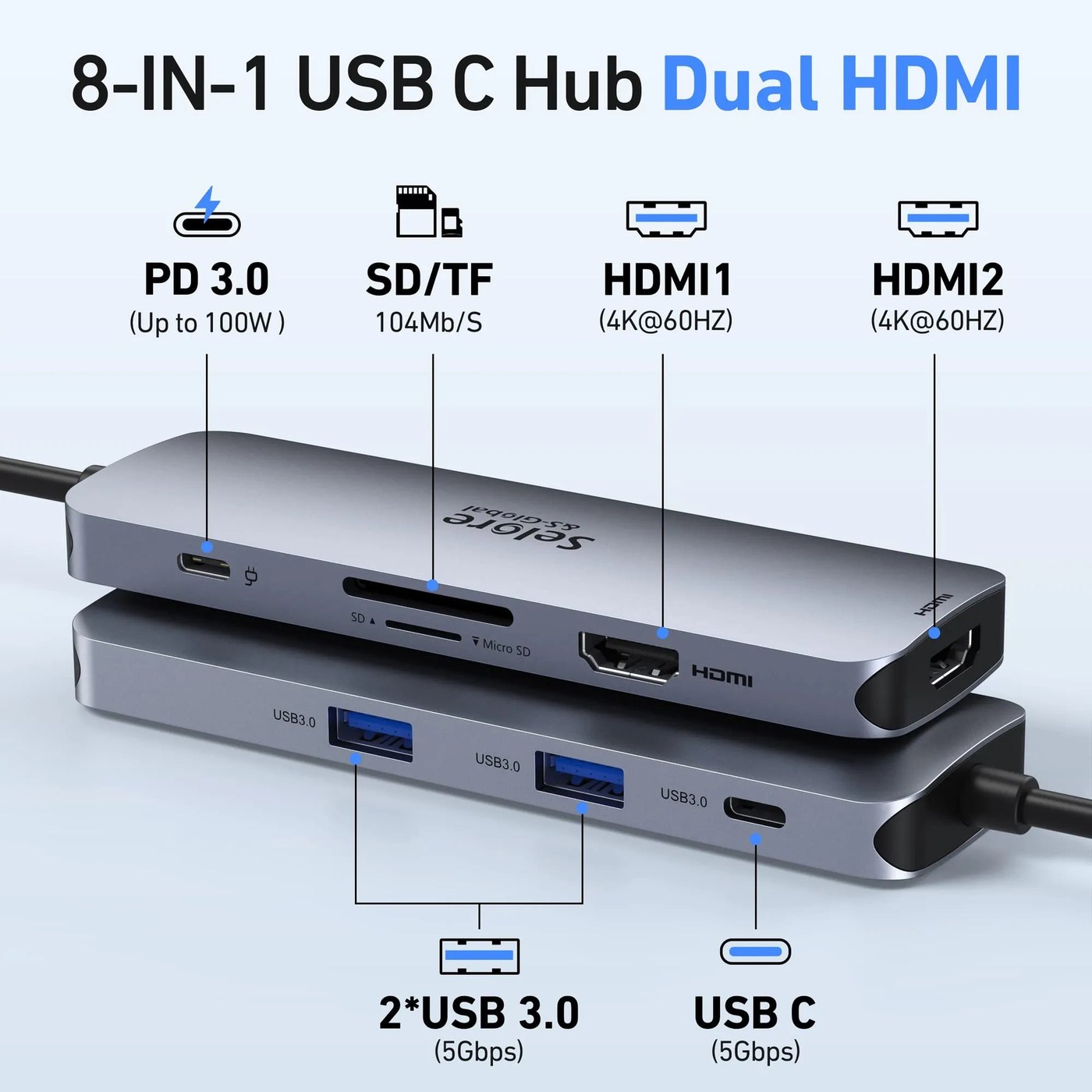
The listing includes two HDMI ports at up to 4K at 60 Hz each, a USB-C power-delivery port that takes up to 100 W and passes about 85 W to the laptop, two USB-A 3.0 ports, one USB-C data port, and SD and microSD slots. It is a compact grey hub — Selore lists it at 5 by 0.7 by 0.13 inches and about 0.22 pounds — not a full Thunderbolt dock, and the port list does not include Ethernet.
The useful catch is the operating system. On a Windows laptop with the right USB-C port, both monitors can show different desktops. On a Mac, both HDMI screens show the same picture. Brands do not pay to be included in our guides.
Who it is for
This is a good fit for a Windows laptop when you want two extended HDMI screens at the same desk, plus charging, USB, and a card reader, without a large dock. Selore’s listing mentions USB-C and Thunderbolt 3 or 4 machines such as Dell XPS, HP, Lenovo, and Surface, and only when that port is full-featured — it has to carry video, data, and charging. A charge-only or data-only USB-C port will not drive either screen.
It can still be useful on a MacBook Pro or Air if you only need a mirrored image on two external displays, along with pass-through charging and the USB and SD ports. If you need two different desktops on a Mac, this is not the adapter for that job.
Ports and features, in plain words
- Two HDMI ports, each listed at up to 4K at 60 Hz, so two monitors can plug in at once.
- A USB-C power-delivery port next to the SD and microSD slots. It accepts up to 100 W from a charger and passes about 85 W to the laptop; the dock uses the rest.
- Two USB-A 3.0 ports, up to 5 Gbps, for things like a mouse, keyboard, or a typical flash drive.
- One extra USB-C port for data only, also up to 5 Gbps. It does not charge the laptop.
- SD and microSD slots. Selore lists the reader at up to 104 MB/s, though one line on the listing also writes this as Mbps.
The charger and the charging cable are not in the box. Use the laptop’s own USB-C charger, or another USB-C PD charger that can supply the listed 100 W input. A low-wattage phone charger will not cover a work laptop and two screens.
Selore describes the dock as plug-and-play and lists a two-year refund or replacement for defective units. The model on this listing is SEUC0422.
Setup notes: Windows vs Mac
Plug the dock into a Thunderbolt or full-featured USB-C port, then connect the monitors to the two HDMI ports. If you want the laptop to charge at the same time, connect your USB-C PD charger to the power-delivery port beside the card slots — not to the extra USB-C data port.
On Windows, Selore says you can extend the desktop across both monitors using MST, as long as the USB-C port supports DisplayPort 1.4. In Windows display settings, set the screens to extend rather than duplicate. If the second screen stays black or the picture looks soft, the port is the likely limit, not a bad HDMI cable.
On macOS, Selore says this adapter does not support dual-screen extension (MST). A Mac gets a mirrored, repeated image on both HDMI screens (SST). That applies to MacBook Pro and Air as well. You still get the HDMI outputs, charging, USB, and card slots; you do not get two independent Mac desktops.
Pros and cons
Pros
- Two HDMI ports, each listed at up to 4K at 60 Hz, from one USB-C cable.
- Pass-through charging, listed at up to 100 W in and about 85 W out to the laptop.
- USB-A, USB-C data, and SD/microSD in a small 8-in-1 hub.
- On a Windows laptop with DisplayPort 1.4 or Thunderbolt USB-C, both monitors can extend.
Cons
- Macs can only mirror; they cannot extend to two different desktops.
- Windows dual-extend needs a full-featured USB-C port with DisplayPort 1.4.
- No Ethernet.
- USB data ports top out at 5 Gbps, so this is not a Thunderbolt-speed dock.
- The charger and charging cable are not included.
FAQ
Can I use two different screens on a Mac?
No. Selore says this adapter does not support dual-screen extension (MST) on macOS. A MacBook Pro or Air, or another Mac, gets the same mirrored picture on both HDMI monitors.
Can Windows extend the desktop to both monitors?
Yes, if the laptop’s USB-C port is full-featured or Thunderbolt and supports DisplayPort 1.4. Selore lists MST mode on Windows for two extended screens. If the second display stays black or looks soft, the port is usually the limit, not the HDMI cable.
Does it charge the laptop?
Yes, through the USB-C power-delivery port next to the SD and microSD slots. Selore lists up to 100 W in and about 85 W out to the laptop. The charger and charging cable are not in the box, so you need a USB-C PD charger that can supply that input — typically the laptop’s own charger. The second USB-C port is for data only and does not charge the laptop.
Will it work in a charge-only USB-C port?
No. Selore says the dock needs a Thunderbolt port or a full-featured USB-C port that can carry video, data, and charging. A port that only charges or only moves data will not drive the screens.
Is there Ethernet? Is this a Thunderbolt dock?
There is no Ethernet port on the listed 8-in-1 layout. It can plug into a Thunderbolt 3 or 4 port, but the USB-A and USB-C data ports are listed at up to 5 Gbps, not Thunderbolt speed.
Verdict
Buy this if you have a Windows laptop with a full-featured USB-C or Thunderbolt port and two HDMI monitors, and you want charging, USB, and a card reader in one small hub. Skip it if you need two separate screens on a Mac, Ethernet, or faster than 5 Gbps for an external drive — or if the laptop’s only USB-C port is for charging. Brands do not pay to be included in our guides.
Comments
Share your thoughts. Be respectful.
No comments yet. Be the first to share your opinion.